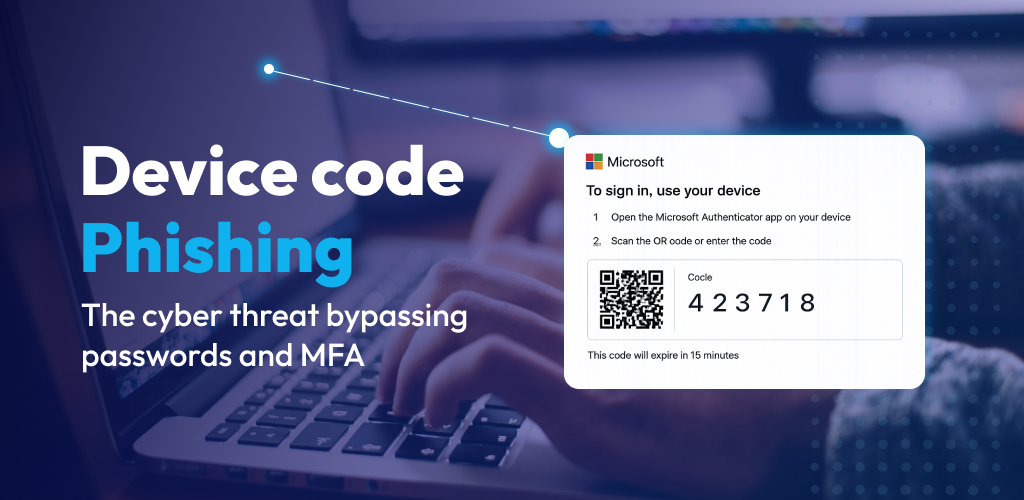
This Bluecube report explains what you need to be watching out for and how to prevent attacks
Cyber threats are evolving at pace and one of the most concerning developments the Bluecube team have seen in 2026 is the rise of device code phishing.
Here we explain how device code phishing works, why it has such a high success rate in catching out the recipient and how to protect your business or organisation from this new and rising cyber-attack threat.
Unlike traditional phishing attacks, this new technique doesn’t rely on fake login pages or stolen passwords. In fact, it uses legitimate authentication systems to gain access to your accounts. This makes this type of attack significantly harder to detect and far more dangerous to end users, businesses or other organisations.
For businesses relying on Microsoft 365 and other cloud platforms, device code phishing (or device token phishing) represents a fast-growing risk that can bypass even well-configured security controls.
What Is Device Code Phishing?
Device code phishing is a social engineering attack that tricks users into authorising a hacker’s login session using a genuine authentication process.
The attack abuses a real feature designed for convenience. The device code login process allows users to sign in on devices like TVs or meeting room systems by entering a short code on another device.
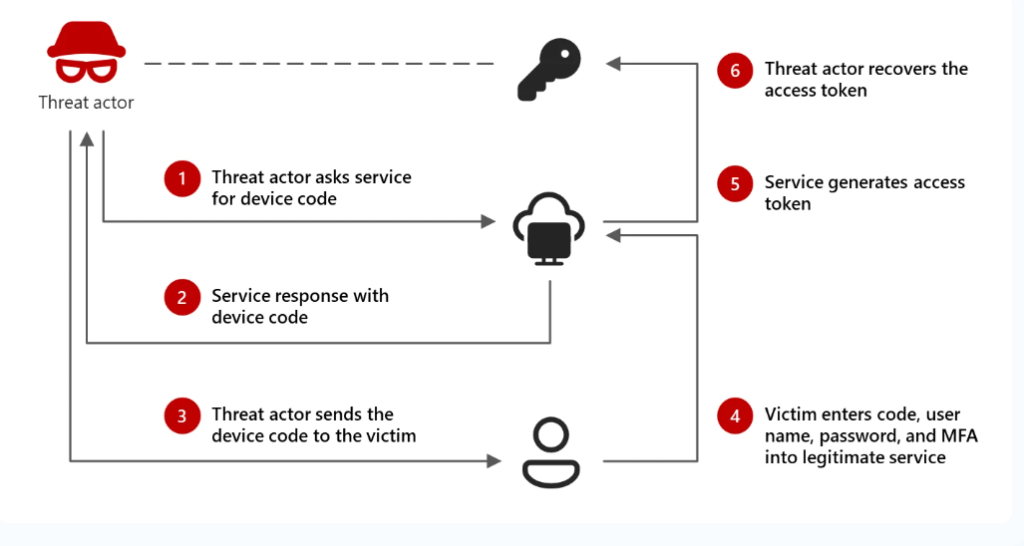
Hackers exploit this by generating a valid login session and then convincing the user to enter the code themselves. By using the code they are unknowingly also granting access to the hacker.
Crucially:
· The login page is real (e.g. Microsoft login)
· The authentication is legitimate
· MFA is often completed successfully
Yet the attacker ends up with full access.
Why Device Code Phishing is So Effective
Device code phishing works because it removes the usual warning signs that people are familiar with and able to spot easily.
There are:
· No fake websites
· No suspicious domains
· No password thefts
Instead, users are redirected to a genuine Microsoft login page, which builds trust instantly. The image below shows how the process works:
Attackers often disguise the request as:
· A Teams meeting invite
· A shared document (e.g. SharePoint or DocuSign)
· An urgent verification or approval request
In many cases, the user completes the process, including MFA, believing they are accessing something legitimate.
The result: The attacker receives authentication tokens, giving them access to emails, files, Teams and more, without ever knowing the password.
Even more concerning:
· Tokens can remain valid after passwords are reset
· Access can persist for days or weeks, often 90 days
· Traditional security tools may not flag the activity immediately
How to Protect Your Business
While device code phishing is harder to detect than other legacy methods of attack, there are practical steps an organisation can take to reduce risk.
1. Educate Users on This Specific Threat
Most people don’t realise this attack even exists. Bluecube can help to raise awareness of the threat across your team and educate staff on how to prevent and report an attempted attack. The cyber security team at Bluecube can send out a “simulated phishing campaign” to identify the human threats within your workforce and educate those that need it as a priority.
2. Be Wary of “Legitimate” Login Requests
If an email or message asks you to:
· Enter a code
· “Verify to view” a document
· Approve a request you weren’t expecting
Treat it as suspicious, assume its malicious until proven not to be, even if it links through to Microsoft. If you report it to Bluecube or any other IT provider/ MSP, they can safely verify the request.
3. Restrict or Monitor Device Code Authentication
Where possible:
· Limit use of device code login flows
· Monitor unusual device registrations
· Apply conditional access policies to detect anomalies
4. Strengthen Identity Security
Traditional security tools focus on endpoints and networks but attackers are targeting identities.
This means:
· Monitoring logins
· Analysing behaviour
· Detecting suspicious token use
Detecting Attacks & Why Detection Matters
The reality is simple; some attacks will get through.
This is where Identity Threat Detection & Response (ITDR) becomes essential.
ITDR is a modern approach to cybersecurity focused on monitoring and protecting user identities and access activity. It works by:
· Detecting suspicious logins and behaviour
· Identifying compromised accounts or sessions
· Responding rapidly to stop attackers before damage is done
Unlike traditional tools, ITDR is designed specifically to detect:
· Account takeover
· Session hijacking
· Rogue Applications
· Business Email Compromise (BEC)
In other words, it addresses exactly the risks created by attacks like device code phishing.
How Bluecube Helps: Huntress ITDR
At Bluecube, we’re helping customers stay ahead of identity-based threats such as device code phishing with Huntress Managed ITDR.
This provides:
· 24/7 monitoring of your Microsoft 365 environment
· Detection of suspicious sign-ins and session hijacking
· Identification of rogue applications and access
· Rapid 24/7 & 365 response to contain threats before they escalate
In many cases using ITDR means that breaches that would have gone unnoticed for days or even weeks can be identified within minutes, significantly reducing their impact.
In Summary
Device code phishing highlights a critical shift in cyber threats. Attackers are no longer breaking I, they’re logging in.
For businesses, this means:
· Education must evolve
· Security controls must adapt
· Detection must become a priority.
Think of these 2 simple rules:
1. If you’re not expecting it, it’s probably not legit. Therefore, get it checked out by your IT security support team.
2. Having a lock on your front door is one thing but having an alarm to know if that lock has been broken is also crucial. Check out ITDR from Huntress supported by Bluecube, ITDR is a powerful and inexpensive tool.
If you’re unsure whether your organisation is protected against this type of attack, now is the time to review your approach.
Posted in: Cyber Security. Tagged: phishing
Can we help?
Contact usIf you have enjoyed reading this article and want to know more about Bluecube, please get in touch. Our friendly team will be happy to answer any queries.